

Activation via license key
Room data sheets – Plugin
€58,90 *
(Recommended regular price – no special offers available)
– All prices are incl. the statutory VAT.
Additional module for the masses and area determination
This additional module provides an analysis and a colored representation of masses and areas in 2D and 3D views according to the living space ordinance and standard DIN 277. Furthermore, the calculated areas can be exported into a list form as PDF, EXCEL, RTF, and HTML format.
The following data and evaluations are provided:
- Floor area
- Living area
- Net floor area < 1,5 m
- Net floor area > 1,5 m
- Summary net floor area
- Room volume
- Net cubic volume
- Gross floor volume
- Gross floor area
In addition, different data can be displayed for the following construction elements:
- Floors: Floor area and volume
- Walls: Footprint, lateral area and volume
- Ceilings: Ceiling area and volume
- Chimneys: Footprint, lateral area and volume
- Pillars: Footprint, lateral area and volume
- 3D constructions: area, volume
- Roof: Roofing area, eaves length, arris length, ridge length, collar length, verge length
This module is included in the following cadvilla versions
Scope of services – room data sheet for the mass and area determination
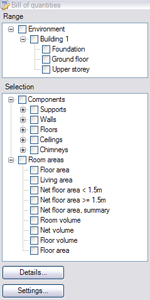 The user interface consists of two tree views – scope and selection. The required scope, construction elements and masses are activated and deactivated using check boxes.
Visualizations can be produced for buildings, floors or individual apartments. The visibility of deactivated objects remains unchanged.
A particular level can of course be activated or deactivated in a view using the settings for visible layers, e.g. ground floor, upper floor, top floor.
The elements to be displayed within the chosen scope can be selected in the ‘Selection’ tree view
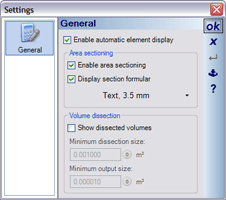 If the option for ‘Automatically adjust display of element“ is activated, then masses and construction elements that have not been selected are transparent or invisible, otherwise they will be displayed normally.
In the section for area segmentation you can specify whether areas should be divided into sub-areas. If so, areas are divided according to the formula for segmentation, and are displayed in different colors.
The formulas used for segmentation can also be displayed, and their text properties can be modified, if necessary.
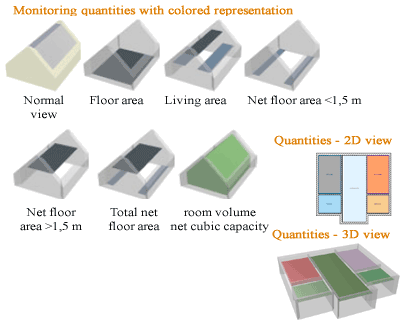 This function provides a colored display of living space in 2D and 3D views according to the German living space ordinance and the DIN standard 277.
The following data and evaluations are provided:
- Floor area
- Living space
- Net floor area < 1.5 m
- Net floor area > 1.5 m
- Total net floor area
- Room volume
- Net cubic volume
- Gross floor volume
- Gross floor area
The floor areas are shown of course at the particular height.
The floor plan can be represented in 2D or 3D and is a great help in documenting the calculation of living space according to the DIN standard 277 or the German living space ordinance.
The mass determination also provides the possibility to create room data sheets for defining a living space according to the German living space ordinance (WoFlV), and the calculation of room cubic capacity according to German DIN 277.
The following formats are available for the output of living space data in list form:
- HTML
- XLS (Microsoft Excel Table)
- RTF (Rich Text Format)
- PDF (Portable Document Format) – is the standard format for documents and can be displayed with freeware software programs such as the Adobe Acrobat Reader.
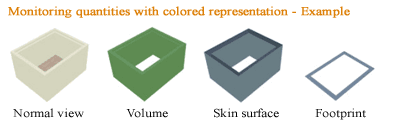 This function provides a colored display of quantities in 2D and 3D views.
You can select the following data and evaluations:
- Floors: Floor area and volume
- Walls: Footprint, lateral area and volume
- Ceilings: Ceiling area and volume
- Chimneys: Footprint, lateral area and volume
- Supports: Footprint, lateral area and volume
- 3D constructions: Area, volume
- Roof: Roofing area, eaves length, arris length, ridge length, collar length, verge length