


Would you like to watch our cadvilla tutorial videos at your own pace? On YouTube, you can easily adjust the playback speed to suit your individual needs. This allows you to play complex steps in slow motion or quickly skip through familiar content. In this short guide, we will show you how to change the speed directly within the video player. Learn how to perfectly adapt the videos to your personal learning rhythm.
1. Open the settings in the video player
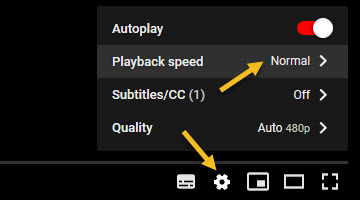 Start playing the desired tutorial video.
- Hover your mouse over the video player. This will reveal the control bar at the bottom edge.
- Click on the
Settingsicon (the small gear icon) located in the bottom right corner of the video. - A small dialog menu with various options will open.
- In this menu, click on the item
Playback speed.
2. Select the desired speed
- By default, the speed is set to
Normal. - Select a value below 1 (e.g.,
0.25,0.5, or0.75) to play the video slower. - Select a value above 1 (e.g.,
1.25,1.5, or2.0) to play the video faster. - Immediately after clicking, the video will continue playing at your newly selected speed