


In the upper section, you will find buttons for:
- The Tutorial, for a smooth start with our software
- Manuals for cadvilla and its individual modules
- Important shortcuts and key combinations for the fast use of cadvilla
- Information regarding online support (remote maintenance)
- Contact via a form for a cadvilla support request
 By clicking on the magnifying glass in the top right corner, you can enter a search term for the support articles – e.g., extend wall – this feature allows you to search for a specific term.
Important: Using the Picture-in-Picture (PiP) Function for Videos
Picture-in-Picture (PiP) allows you to watch videos from the support article in a floating window over other applications. This provides you with the optimal conditions for learning cadvilla quickly. You can find more information about this in our article on the Picture-in-Picture (PiP) video function.
Changing the Playback Speed and Resolution of Videos
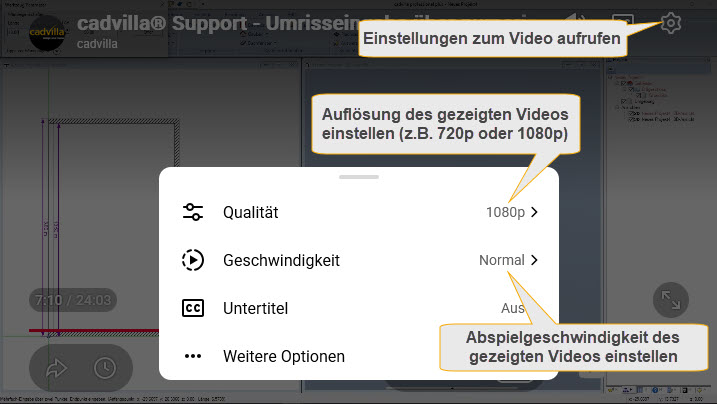 To change the playback speed and resolution of the videos, first start the video by clicking the “Play” button. Then, move your cursor over the video area again and click on the displayed gear icon (Settings).
A window will open, and by clicking on “Speed,” you can set the video’s playback speed to be either slower or faster.
You can choose between the playback values 0.25, 0.5, Normal, 1.25, 1.50, and 2.0.
When setting the resolution, we recommend selecting either 720p or 1080p.
Remote Support – Online Support – Remote Maintenance
 By clicking on “Remote Support” (image on the side) and subsequently running the file, a software for remote maintenance (online support) will be started. For more information on remote maintenance, click on Online Support in the upper section.
cadvilla Tutorial for Beginners
 We have an extensive video collection where an entire floor plan is drawn from start to finish. This video collection covers the most important points for constructing a building – starting with the:
- Setting options in cadvilla
- Input options for interior and exterior walls, window input, door input
- Definition of a roof and input of dormers
- Creation of multiple floors
- Placing furnishings in the project and texturing surfaces
- and much more…
cadvilla on YouTube

All available YouTube videos are accessible here in the support area and are described in detail with jump marks accordingly. Furthermore, the videos here in the support area are without advertising. However, if you are looking for cadvilla training videos directly on YouTube, you can find them at:
www.youtube.com/cadvilla