


To speed up your planning and increase precision, the software offers various intelligent support functions. These tools help you complete routine tasks faster and position components exactly.
1. Precise input and construction
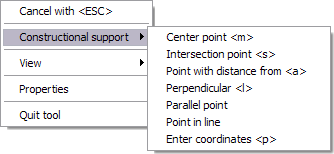
- Construction aids: Use the construction aids in the context menu (right-click) while entering walls to find wall points graphically. The construction aids include functions for
Center point,Intersection point,Point with distance from,Perpendicular,Parallel point,Point in lineandEnter coordinates.
- Change reference points (CTRL + W): An essential tool when entering walls is changing the reference side. Press the key combination
CTRL + Wwhile drawing walls to toggle through the reference point of the wall.- Advantage: This allows you to decide directly whether you want to construct using exterior dimensions, interior dimensions, or the wall axis, without having to draw guidelines.
2. Duplicating and adjusting
- Multiple copies: Quickly and easily create multiple copies of an existing element (e.g., columns or windows) at a defined distance. To do this, select an element > Right-click >
Multiple copy. - Transfer properties: Save time by transferring the settings of a fully configured component (e.g., a window) to other elements of the same type with just one click. To do this, select a 3D element > Right-click >
Transfer properties.